Monday, July 19, 2010

A+ for Engrade


During this week of Literacy and Technology, I was introduced to a free grading software program called Engrade. Engrade is a new software program that allows teachers to place their class rosters online and then digitally record their students' grades and attendance. The program requires teachers to assign their students with a numeric code which allows parents and students to access students' grades, class calendar, attendance records, and comments about their performance online. Teachers are given several options on how they would like their grades recorded. For example, they may choose between recording grades as percentages or letters. Afterward, teachers may place their assignments into categories and decide how they would like weigh each category. Grade are calculated either manually or automatically with this software.

This program is very useful to teachers because it is easy to use and allows teachers to record their grades in no time at all. It is a user-friendly tool that will help teachers keep organized; and it will be especially helpful when transferring grades to report cards at the end of each marking period. This program is also beneficial to teachers because it allows them to keep in constant contact with parents and students. As long as parents have access to the internet, this program would allow them to see their child's grades on a daily basis. Students and parents can also access their teacher's page to check the due dates for projects, homework assignments, or upcoming tests. However, if they do not have internet access, they would not be able to benefit from the program in these ways. Students may be more motivated to apply themselves and keep up their grades if they know that their parents will see them on a regular basis.

With every new software program there is always room for some improvement. There are some features that could be added to the program that may make it even more user-friendly for teachers, parents, and students. It would be helpful for the program to allow teachers to more easily place a percentage range for each grade rather than only A, B,C,D, and F. It might also be nice for teachers to have the option to categorize assignments by subject so that parents and students can have an easier time distinguishing between assignments. Finally, adding an e-mail option for teachers to send their grade book to parents after updates are made would be an excellent feature for Engrade to include. Programs such as Engrade would be an excellent addition to any school district for recording grades in the 21st century!

Thursday, July 15, 2010

A Taste of Web 2.0


I have only just begun learning about all of the tools that Web 2.0 has to offer. These tools promote collaboration, inquiry, connectivism, problem-solving, creativity, and much more! I had experience working with some of these tools prior to my Lit and Tech course such as Facebook and Photobucket. When I first began using Facebook, I did not understand what all the hype was about, however I quickly became hooked! I have friends and family in all different parts of the world, and Facebook enables me to stay connected with them and learn about new things that are happening in their life. I understand why so many students feel that their social-networking sites are an extension of who they are as individuals. I have used Photobucket and a program called Picnik in order to edit my photos and place them on to my social networking sites. Picnik is an awesome site that allows users to add texts to pictures and make them their own. One my favorite things to do is add lyrics to pictures that represent the image.

I have been introduced to several different Web 2.0 tools during Lit and Tech. One of my favorite tools is blogging. Blogging allows users to share their ideas in a creative way and stay connected with their peers. I could imagine that using blogs with students would give them a great sense of accomplishment because they are able to publish their work to the web. Some of my favorite 2.0 tools are those that allow users to collaborate. These include programs such as Google Docs, Webspiration, and Wikis. I have had an awesome experience with each of these programs throughout the semester. They have allowed me to collaborate evenly with my group members from group 5 in a much more user-friendly manner than I have experienced before. Recently, I created my first Podcast using podomatic. This was a very different experience for me and I found it a lot of fun. The world of web 2.0 has opened endless possibilities for teachers and their students. I look forward to working with more of them in the future!

Combining Teaching Models


Every teacher has their own unique teaching style. After having experience in the classroom, they begin to learn what works and what does not. They understand that some lessons are better taught using a direct approach, while others may be more successful when taught indirectly or cooperatively. The readings for week 3 described four different teaching models. These models are: Behavioral, Information-processing, Social-Interactive, and Personal. The goal of behavioral systems is to change the behavior of the student by teaching him/her new skills. Strategies used with behavioral models include direct instruction and mastery learning. Programs for this teaching model tend to be informative in nature and provide little or no opportunity for students to interact with the program. Information-processing models aim to create thoughtful students who think critically. Strategies for this model include inquiry model and problem solving. Many different programs have been created to expand upon a child's skills in inquiry. These programs often take the form of interactive learning games that allow students to be actively involved in their learning process. These tools are loved by students and are excellent additions to any classroom.

The Social-Interactive model revolves around developing a student's social and communication skills. Group work and cooperative learning are two of the prevalent strategies used with social-interactive models. Many programs promote social interaction and group work. Some such programs include: Google Docs, Webspiration , and Zoho. These are excellent programs that allow students to collaborate on assignments and teachers to determine who did what during a project. Finally, personal models are used to help students see things in a different way. Strategies used for this are mind-mapping and nondirective teaching. Some of the programs that promote personal models are Inspiration and mindjet. These mind mapping programs are a great way for students to see things visually rather than in a traditional, written format.

It is important for teachers to use a combination of all four teaching models throughout their instruction. Effective teachers take their students into account along with the content that they are teaching and determine the appropriate model that they should use for each of their lessons. Students do not all learn in the same way, and therefore lessons should be taught in order to benefit multiple intelligences.

Wednesday, July 14, 2010

Developing Your Own Learning Environment


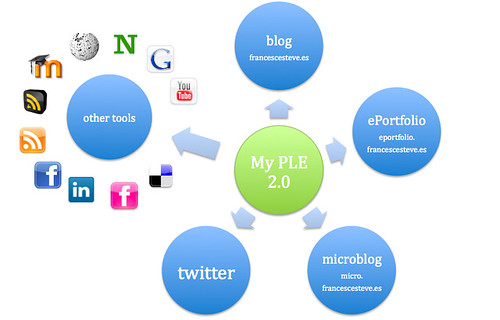
Stephen Downes' video, "Personal Learning Environments" introduced me to a new term in the field of education. In many ways, a Personal Learning Environment (PLE) for students reminded me of some of the different functions made available by programs such as Google Reader. A PLE consists of a combination of various tools that the user might place in their 2.0 toolkit. For example a user's PLE might include: personal documents, websites that the user frequents, or feeds and blogs that the user has subscribed to. The user will is able to use their PLE to network with a community of people and share their thoughts and ideas through e-mails and newsletters. Communicating and learning with others is the central idea behind the development of a PLE. In fact, using PLE's in this manner has helped Downes instruct an online class with over 2,200 students who all collaborated and learned from one another.

Developing a PLE will help students become actively involved in their learning process. The collection of various websites and resources will immerse students in learning so that they are not simply learning a set of facts, but are instead demonstrating a thorough understanding of the material. Downes gave the example of a student performing acts as a geographer would rather than sharing facts about geography.

As educators, we must help our students develop a PLE of their own. We can do this first by continuously learning about different resources that are available. Afterward, we can share these resources with our students so that they can learn from them and use them to share their knowledge with their peers. Students should be encouraged to communicate, share ideas, and learn from one another. Once they have developed their PLE, they will continuously have access to sites of interest to them and be able to actively participate in a learning community.

Life's Big Questions


After reading Holly MacDonald's article "The Learning Professional’s toolkit – what’s essential?" I felt all the more confident that I am learning a great deal of important information in Literacy and Technology that will benefit me for years to come. MacDonald provides her reader with an outline of resources which she believes are essential for the average person in the 21st century to become familiar with and understand. She states it is important that everyone know how to blog, Screencast (Jing), use a search engine (Google), use a web browser, use a video camera (Web Cam or Flip), collaborate through the web (Google Docs), and join an online community (WDYWYD). I agree with MacDonald that all of these resources are important and find it interesting that each of them have been key components of what I have learned so far in Lit and Tech.

I understood how to use some of these resources prior to taking this course (i.e. how to use web browsers, video cameras, a search engine). However, I was unfamiliar with some of these resources until the class began. I know understand how to blog (See! :)), Screencast, and collaborate with groups through the web. In fact, after learning about some of these tools, I sometimes wonder how I have gotten through so many college courses without them. Understanding how to use these resources has opened so many possibilities for the work I do in my future grad classes and teaching career! I think it is important that I help my students become familiar with all of these tools, as they will be expected to use them long before their graduate school years!

Tuesday, July 13, 2010

The Battle Between Good vs. Bad Technology


Stephen Downes makes some excellent points in his article entitled, "Nine Rules for Good Technology." He mentioned that effective classroom technology must be simple to use. A teacher's job is in fact to teach, and therefore they should not be required to have a computer engineering degree in order to use technology in their classrooms. He points out that our goal as educators is to guide our students to use technology independently and therefore we must have "good technology" available in our classrooms at all times. Downes states that in order for technology to be "good" it must meet the following 9 criteria: Technology must be:

1) Always Available- Always in the classroom and not shared between several different classrooms and teachers.

2) Always on- On at all times or able to be turned on by the simple push of a button (i.e. Smartboards)

3) Always Connected-Does not require many people to help connect and set it up

4) Standardized- Works with any computer, web browser, or internet provider

5) Simple- One learns how to use it by doing rather than reading the manual

6) Doesn't Require Parts- Start up is simple and does not require other parts in order to work effectively

7) Personalized-Allows the user to make it their own and use it for their own purpose

8) Modular- Made up of parts that work together effectively

9) Does What You Want it to Do- Works appropriately and does not to do whatever it wants.

Downes makes some excellent points with these nine criteria. His article and what he refers to as "Stupid Technology" reminds me of many classrooms that I have been in in the past. Technology is often too difficult for teachers and students to use. I remember several occasions when my grade school teachers would call in assistance because the computers, projectors, and other technology were not cooperating with him/her. I agree that good technology must be simple if it is to gain a widespread appeal. Having computers, Smartboards, etc. on and connected at all times is an excellent way to avoid the distractions that can come from technology that is not working. However, even the best technology may not work at all times; there will always be the chance of something unforeseeable occurring while using different technology in the classroom. This is why the best teachers always think on their feet and have a backup plan for those times technology decides to misbehave.

Thursday, July 8, 2010

Making a Slide Show is as Easy as 1-2-3


I just finished my slide show presentation of all my first digital prints using Picasion. I was surprised to find how easy this program was to use. After learning how to take screenshots with the help of my peers through the Teacher's Lounge, I was able to create JPEG files from the images and then attach these files into the Picasion website. Afterward, I simply pressed "Create Animation" and my slide show appeared on my screen in seconds! This is definitely a program I will use in the future to make slide shows with my pictures!


I am really proud of each of the different wep pages that are incorporated into my Picasion slide show. I just became a new member to Twitter and I am slowly learning about all of the educational benefits that it has. My individual and group wikis are still a work in progress. Wikis are new to me this semester and I am still trying to work out the kinks with using them. I look forward to seeing what my wikis will look like by the end of the semester! I decided to add my Facebook page to the slide show as well, because it is an example of yet another social networking site that is popular with students today. My favorite digital image, however is of my blog. I have truly enjoyed my first blogging experience with Literacy and Technology, and I look forward to more blogging in the future!